

Namespaces and Scope#
The following is taken from: https://www.geeksforgeeks.org/namespaces-and-scope-in-python but also see https://realpython.com/python-namespaces-scope/#the-global-declaration
A namespace is a system that has a unique name for each and every object in Python. An object might be a variable or a method. This way the Python interpreter understands what exact method or variable one is trying to point to in the code, depending upon the namespace. So, the division of the word itself gives a little more information. Its Name (which means name, a unique identifier) + Space(which talks something related to scope). Here, a name might be of any Python method or variable and space depends upon the location from where is trying to access a variable or a method.
Types of namespaces#
When the Python interpreter runs solely without any user-defined modules, methods, classes, etc. some functions like print() are always present, these are built-in namespaces. When a user creates a module, a global namespace gets created, later the creation of local functions creates the local namespace. The built-in namespace encompasses the global namespace and the global namespace encompasses the local namespace.

Local vs. global variables & Scopes#
A namespace is a mapping from names to objects. A scope is a textual region of a Python program where a namespace is directly accessible. Scope refers to the coding region from which a particular Python object is accessible. Hence one cannot access any particular object from anywhere from the code, the accessing has to be allowed by the scope of the object.
Note
Each function has its own “local” name space.
Let’s take an example to have a detailed understanding of the same:
a = 123       # lives in the global name space

def myFunction():
    print("a as seen from the function:", a)

myFunction()
print("a as seen from the outside: ", a)
a as seen from the function: 123
a as seen from the outside:  123
a = 123       # lives in the global name space

def myFunction():
    b = 456   # lives in the local name space of the function
    print("a as seen from the function:", a)
    print("b as seen from the function:", b)

myFunction()

print("a as seen from the outside: ", a)
print("b as seen from the outside: ", b)
a as seen from the function: 123
b as seen from the function: 456
a as seen from the outside:  123
---------------------------------------------------------------------------
NameError                                 Traceback (most recent call last)
Cell In[2], line 11
      8 myFunction()
     10 print("a as seen from the outside: ", a)
---> 11 print("b as seen from the outside: ", b)

NameError: name 'b' is not defined
a = 123       # lives in the global name space

def myFunction():
    a = 789
    print("a as seen from the function:", a)

myFunction()

print("a as seen from the outside: ", a)
a as seen from the function: 789
a as seen from the outside:  123
a = 123       # lives in the global name space

def myFunction():
    global a
    a = 789
    print("a as seen from the function:", a)

myFunction()

print("a as seen from the outside: ", a)
a as seen from the function: 789
a as seen from the outside:  789
Lifetime of a namespace#
A lifetime of a namespace depends upon the scope of objects, if the scope of an object ends, the lifetime of that namespace comes to an end. Hence, it is not possible to access the inner namespace’s objects from an outer namespace.
var1 = 5         # var1 is in the global namespace
def some_func():

    var2 = 6     # var2 is in the local namespace

    def some_inner_func():

        var3 = 7 # var3 is in the nested local namespace
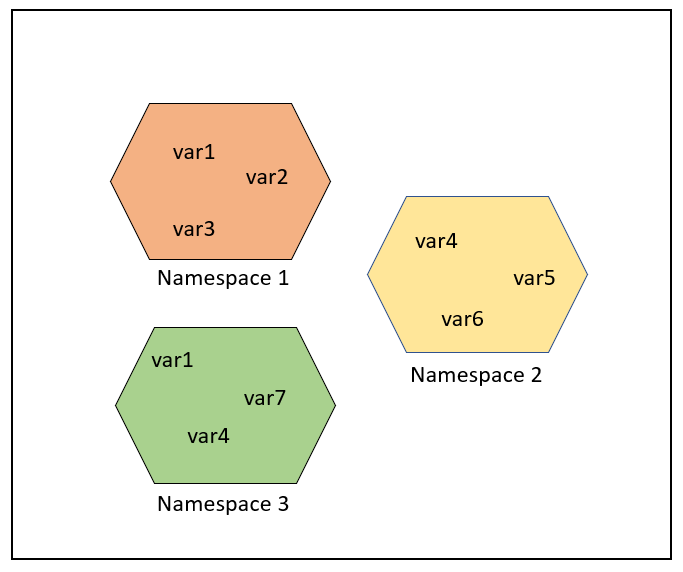
As shown in the following figure, the same object name can be present in multiple namespaces as isolation between the same name is maintained by their namespace.
But in some cases, one might be interested in updating or processing global variables only, as shown in the following example, one should mark it explicitly as global and the update or process. Note that the line count = count + 1 references the global variable and therefore uses the global variable, but compare this with commenting out #global count.
count = 5
def some_method():
    global count
    count = count + 1
    print(count)

some_method()
6