

Monte Carlo Techniques#
import numpy as np
import matplotlib.pyplot as plt
# animated
import matplotlib
import matplotlib.animation as animation
# set the animation style to "jshtml" (for the use in Jupyter)
matplotlib.rcParams['animation.html'] = 'jshtml'
Monte Carlo Integration#
a) Calculating \(\pi\)#
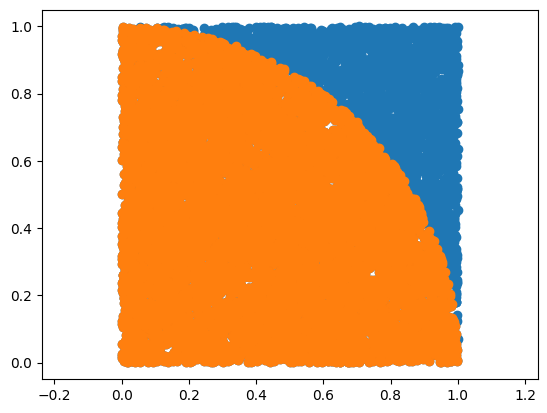
generate \(N\) random \((x,y)\) pairs with \(0 \le x,y \le 1\)
calculate \(r\) for all of them
count how many pairs (\(n\)) lay inside the circle (\(r \le 1\))
from \(A = \pi r^2\) we than get: \(\pi = \frac{4n}{N}\)
N = 10000
x, y = np.random.rand(2, N)
r = np.sqrt(x**2.0 + y**2.0)
mypi = 4.0*len( r[r <= 1] ) / N
print(" MC Pi =", mypi)
print(" Error :", 100*(1.0 - mypi/np.pi), "%")
plt.figure(1)
plt.plot(x, y, 'o')
plt.plot(x[r < 1], y[r < 1], 'o')
plt.axis("equal")
plt.show()
MC Pi = 3.1508
Error : -0.29307893878876 %
b) Multi-dimensional volume (n-dim sphere)#

np.random.seed(123)
def getNDimSphereVol(dim):
N = 1000000
x = np.random.rand(dim, N)
dist = np.sum( x**2, axis=0 )
vol = 2.0**dim * len(dist[dist<1]) / N
return vol
print(' 0D: %f vs. %f R^0'%(getNDimSphereVol(dim=0), 1))
print(' 1D: %f vs. %f R^1'%(getNDimSphereVol(dim=1), 2))
print(' 2D: %f vs. %f R^2'%(getNDimSphereVol(dim=2), 3.142))
print(' 3D: %f vs. %f R^3'%(getNDimSphereVol(dim=3), 4.189))
print(' 4D: %f vs. %f R^4'%(getNDimSphereVol(dim=4), 4.935))
print(' 5D: %f vs. %f R^5'%(getNDimSphereVol(dim=5), 5.264))
print(' 6D: %f vs. %f R^6'%(getNDimSphereVol(dim=6), 5.168))
print(' 7D: %f vs. %f R^7'%(getNDimSphereVol(dim=7), 4.725))
0D: 1.000000 vs. 1.000000 R^0
1D: 2.000000 vs. 2.000000 R^1
2D: 3.140652 vs. 3.142000 R^2
3D: 4.185720 vs. 4.189000 R^3
4D: 4.940704 vs. 4.935000 R^4
5D: 5.249216 vs. 5.264000 R^5
6D: 5.180992 vs. 5.168000 R^6
7D: 4.736000 vs. 4.725000 R^7
1000000**(1./7.)
7.196856730011519
Monte Carlo Mean Values#
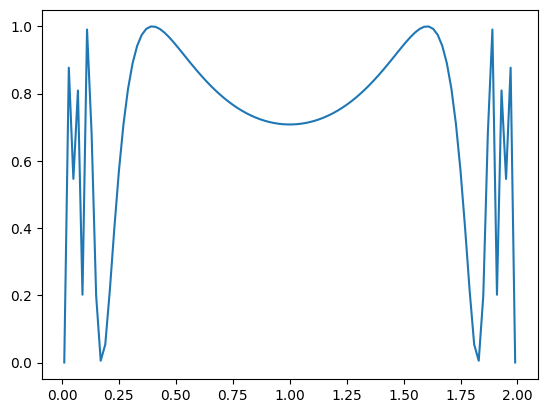
def f(x):
return (np.sin(1/(x*(2-x))))**2
dx = 0.01
x = np.linspace(dx, 2.0-dx, 100)
print( "Simple mean:", np.mean(f(x)) )
plt.figure(1)
plt.plot(x, f(x))
plt.show()
Simple mean: 0.728999486125733
N = 1000000
x = 2.0 * np.random.rand(N)
y = f(x)
I = 2.0/N * y.sum()
print( "MC mean:", np.mean(f(x)) )
MC mean: 0.7258550606385165
Random Walks#
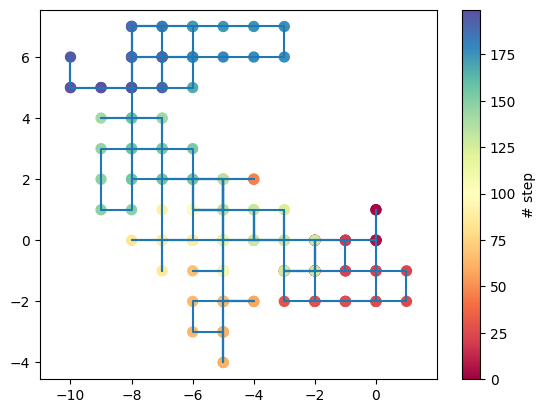
path that consists of a succession of random steps
examples include:
path traced by a molecule as it travels
price of a fluctuating stock
financial status of a gambler
…
have applications to ecology, psychology, computer science, physics, chemistry, biology, ..
closely connected to Markov chains (sequence of possible events in which the probability of each event depends only on the state from the previous event)
https://en.wikipedia.org/wiki/Random_walk / https://en.wikipedia.org/wiki/Markov_chain
def randomWalk(length):
walk = np.zeros((length, 2))
for i in range(1, length):
walk[i, :] = walk[i-1, :]
# toss a 4-side coin to decide where to go
new = np.random.randint(1,5) # randomly choose from 1,2,3,4
if(new == 1):
walk[i, 0] += 1
elif(new == 2):
walk[i, 1] += 1
elif(new == 3):
walk[i, 0] -= 1
else:
walk[i, 1] -= 1
return walk
nStep = 200
walk = randomWalk(nStep)
plt.figure(1)
plt.plot(walk[:, 0], walk[:, 1], label= 'Random walk')
plt.scatter(walk[:, 0], walk[:, 1], s=51, c=range(nStep), cmap='Spectral')
plt.colorbar(label='# step')
plt.axis('equal')
plt.show()
# animated
import matplotlib
import matplotlib.animation as animation
# set the animation style to "jshtml" (for the use in Jupyter)
matplotlib.rcParams['animation.html'] = 'jshtml'
fig = plt.figure()
line, = plt.plot(walk[:, 0],walk[:, 1], '-')
point, = plt.plot([0,0], [0,0], 'o')
plt.axis('equal')
plt.close()
def init():
line.set_data([], [])
return line,
def animate(i):
x = walk[:i, 0]
y = walk[:i, 1]
line.set_data(x, y)
if (i > 0):
point.set_data([x[-1]],[y[-1]])
return line, point
myAnimation = animation.FuncAnimation(fig, animate, init_func=init,
frames=nStep, interval=100, blit=True)
myAnimation
Random Surfer: PageRank#

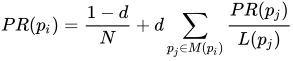
\(p_i\): pages under consideration
\(M(p_i)\): set of pages that link to \(p_{i}\)
\(N\): total number of pages
\(d\): probability that a surfer jumps randomly
\(L\): number of links on page
\(\Rightarrow\) can be iteratively evaluated, calculated as an eigenvalue problem, or using a random surfer
# Website Graph:
#
# 0---1
# | 4 |
# 3---2
# define nodes and their links
nodes = dict()
nodes[0] = np.array([1,3,4]) # node / website 0 is connected to 1,3,4
nodes[1] = np.array([0,2,4]) # 1 0,2,4
nodes[2] = np.array([1,3,4]) # ...
nodes[3] = np.array([0,2,4])
nodes[4] = np.array([0,1,2,3])
def getPageRank(nodes, nSteps):
nodesCount = np.zeros(len(nodes))
pos = 4 # initial position
for i in range(0, nSteps):
# toss a coin
r = np.random.rand()
# click random link on actual side
if(r <= 0.85):
rl = np.random.randint(len(nodes[pos]))
pos = nodes[pos][rl]
# jump to random page
else:
pos = np.random.randint(len(nodes))
nodesCount[pos] += 1
return nodesCount[:] / np.sum(nodesCount)
PageRank = getPageRank(nodes, 100000)
print(" Node PageRank")
print(" ----------------")
for i in range(len(nodes)):
print(" %2d %4.3f"%(i, PageRank[i]))
Node PageRank
----------------
0 0.189
1 0.188
2 0.190
3 0.191
4 0.242
# Website Graph: ... why it can be (could have been) worth to buy links
#
# 0---1
# | 4 |
# 3---2--5
# |
# 6
nodes = dict()
nodes[0] = np.array([1,3,4])
nodes[1] = np.array([0,2,4])
nodes[2] = np.array([1,3,4,5,6])
nodes[3] = np.array([0,2,4])
nodes[4] = np.array([0,1,2,3])
nodes[5] = np.array([2])
nodes[6] = np.array([2])
PageRank = getPageRank(nodes, 100000)
print(" Node PageRank")
print(" ----------------")
for i in range(len(nodes)):
print(" %2d %4.3f"%(i, PageRank[i]))
Node PageRank
----------------
0 0.143
1 0.145
2 0.252
3 0.144
4 0.187
5 0.065
6 0.064
Metropolis Algorithm / Simulated Annealing#
a) Minimization via Metropolis#
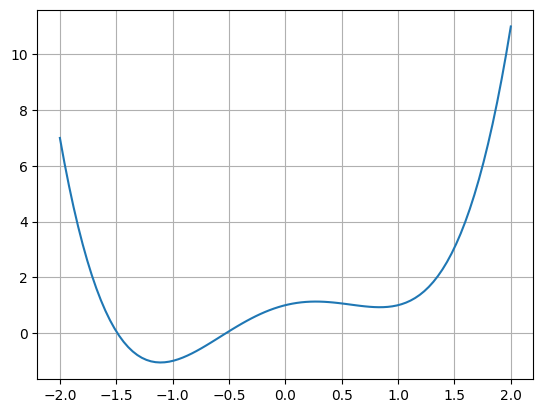
# define our function
def f1D(x):
return x**4.0 - 2.0*x**2.0 + x + 1.0
# and plot it
plt.figure(1)
plt.grid()
x = np.linspace(-2, 2, 100)
plt.plot(x, f1D(x))
plt.show()
# Metropolis algorithm
def getMinimumMet(f, N, kT):
moves = np.zeros(N)
x0 = 1.5 # initial position
for i in range(0, N):
# save the move
moves[i] = x0
# get random number between -2 and +2
step = np.random.rand() * 1.0 - 0.5
x1 = x0 + step
if x1 > 2:
x1 = 2
if x1 <-2:
x1 = -2
#x1 = np.random.rand() * 4.0 - 2.0
# if new x results in smaller f(x) we accept the move immediately
if(f(x1) <= f(x0)):
x0 = x1
else:
# otherwise we toss a coin
r = np.random.rand()
# and define acceptance (Boltzmann probability)
P = np.exp(- (f(x1) - f(x0)) / kT)
if(r < P):
x0 = x1
return moves
moves = getMinimumMet(f=f1D, N=400, kT=1.0)
# plot and animate the steps
fig = plt.figure()
x = np.linspace(-2, 2, 100)
plt.plot(x, f1D(x))
point, = plt.plot([0,0], [0,0], 'o')
point2, = plt.plot([0,0], [0,0], 'o', markersize=12)
plt.close()
def animate(i):
point.set_data(moves[0:i], f1D(moves[0:i]))
point2.set_data([moves[i]], [f1D(moves[i])])
myAnimation = animation.FuncAnimation(fig, animate, frames=len(moves), interval=20)
myAnimation